Fleeting Thoughts,
Zero Friction.

A sub-15ms wake, 5MB idle footprint buffer engineered in front of Obsidian and Notion.
Armed with an autonomous IME shield and air-gapped local AI for instant thought capture.

Get Latest Release User Manual & Docs ↗
winget install youshinh.md-memo
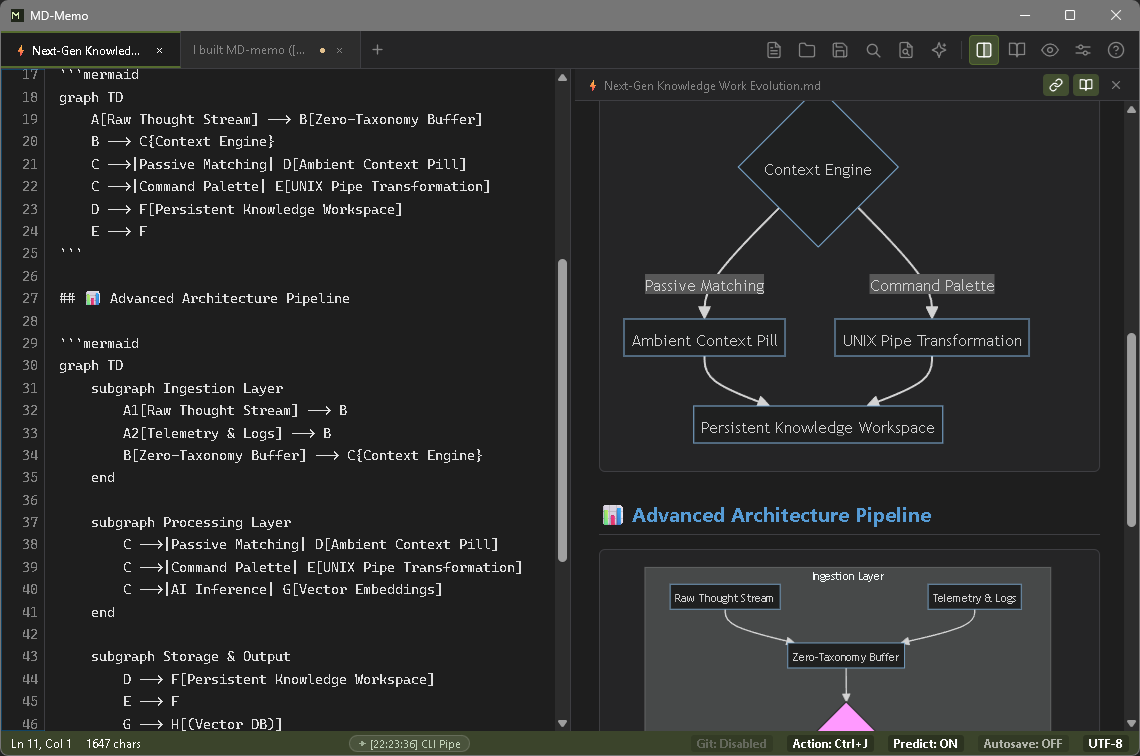
MD-Memo Split Editor and Mermaid Diagram Preview
< 15ms
Hotkey Wake Latency
Instant cursor restoration via Ctrl+Alt+M
5–15 MB
Idle Memory Footprint
Aggressive reclamation via debug.FreeOSMemory()
11 µs
Autonomous IME Overhead
Guaranteed zero full-width typos in code blocks
100%
Local-First Storage
Direct POSIX .md persistence with optional AI

The Paradox of Distance:
Thought & Scratchpad

Modern knowledge vaults like Obsidian or Notion excel at long-term synthesis, but multi-second load times break cognitive momentum.
MD-Memo does not replace your vault. It is the zero-friction buffer standing directly in front of it.

Dimension Standard Text Editors Knowledge Vaults (Notion / Obsidian) MD-Memo
Architecture C++ / Swift / Rust Electron / Chromium (Heavyweight) Go 1.26 + OS-Native WebView
Summon Latency ~100ms (Cold boot) 2.0s – 5.0s (JS runtime init) < 15ms (System tray resident)
Idle Memory ~15 MB 400 MB – 800 MB+ 5 – 15 MB (Aggressive GC reclamation)
IME Handling OS default (Typos in code) OS default Autonomous IME Shield (Syntax Guardian)
AI Assistance Cloud-only (Paid / API key) Cloud-only / Third-party plugins Air-gapped Local (Ollama) / Optional Cloud AI
Storage Model Plain text Proprietary DB / Vendor Cloud Sync 100% Local POSIX Plain Text

Technical Foundation & Details

Unobtrusive, instantaneous, and never interrupting your train of thought. Engineering poured into every nuance.

Zero-Latency Resident Wake

Instantly summon from the system tray via Ctrl+Alt+M (macOS: from the Dock via Option+Cmd+M). On window minimize, debug.FreeOSMemory() aggressively shrinks the working set to 5–15 MB.

  • Go 1.26
  • OS Native WebView
  • Zero IPC Lag

Autonomous IME Shield

Automatically intercepts full-width CJK characters inside inline code (`...`), code fences, and URLs. Log-Likelihood Ratio Testing (LLRT) catches accidental direct-mode Romaji typos.

  • 11µs Overhead
  • LLRT Engine
  • Syntax Guardian

Local-First AI (Ghost Text)

Pair with offline Ollama / vLLM instances without data leakage. Press Ctrl+→ to accept high-speed predictive completions. Optional cloud models available for complex reasoning.

  • Local / Offline
  • Ollama / vLLM
  • Ghost Text

UNIX Pipes & CLI Automation

Pipe terminal streams via cat build.log | md-memo to running instances over local TCP IPC. Press Ctrl+E for the Command Bar: type a shell command, or press Tab to switch to AI mode for natural-language OS commands that a local safety guard checks before they run.

  • Local TCP IPC
  • Safe CLI Agent
  • Pipe Filter

Parallel Scrap Search

Harnesses runtime.NumCPU() worker threads and a zero-allocation parallel scanner to search across all daily scraps (scraps/YYYY-MM-DD.md) instantaneously.

  • Parallel Scan
  • 150ms Debounce
  • Auto Highlight

Silent Background Git Sync

Auto-commits and pushes in the background after 30 seconds of keyboard idle. Auto-rebases on launch. Provide an empty Git repository URL in settings for effortless multi-device sync.

  • Auto Pull / Push
  • Conflict-Free
  • Zero Friction

Ask AI

Select text (or just place the caret), press Ctrl+L and type an instruction: the built-in LLM's answer is inserted right below it in seconds, and your own text is never replaced. Alt+C proofreads with no instruction at all.

  • Ctrl+L
  • Answer Below
  • Alt+C Proofread

Auto Selector: Ask, Delegate, Run

Write a line and press Ctrl+Enter: fixed local rules decide whether it goes to the built-in LLM, an agent CLI (Claude Code, Codex, Hermes, Antigravity) or a command. The result lands below your line. By default agents and commands wait for a second press; when the rules are unsure, the Ask AI bar opens. Write {{ @agent ... }} yourself; agents live in agents.yaml.

  • Ctrl+Enter
  • Result Below
  • agents.yaml

Quick Actions: What Next?

Not sure what to do? Press Ctrl+J for up to three next steps for what you are writing. It runs on built-in local rules by default, so nothing leaves your machine, and every shell command passes an AST guardrail first. Click the status-bar Action badge to switch between On, Manual and Off.

  • Ctrl+J
  • Local rules
  • AST guardrail

Smart Paste

Ctrl+V converts HTML from Excel, Word or Google Docs into Markdown — tables, lists, code blocks and links included — with no external converter, and runs vision OCR when the clipboard holds only an image. Code and logs from editors and terminals stay as they are. Ctrl+Shift+V pastes as it is, with no conversion. About 1 MB of HTML converts in roughly 90 ms.

  • Ctrl+V
  • Ctrl+Shift+V
  • HTML → Markdown

Voice Input

Start dictation from the toolbar microphone, the right-click menu, the command palette or a configurable shortcut (Ctrl+Shift+R by default); a marker at the caret tracks progress while you keep typing elsewhere. Recording stops after a few seconds of silence or a second press of the shortcut, and Esc discards it. The default model is Gemini 3.5 Transcribe, and it needs an API key in Settings, shared with image OCR.

  • Ctrl+Shift+R
  • Gemini 3.5 Transcribe
  • Esc to discard

File Links

Drop a file onto the editor to insert a link at the caret; it is copied into ./assets so the link keeps working. Ctrl+Click opens it with the OS default app, Alt+Click reveals it in Explorer or Finder, and hovering an image link shows a thumbnail.

  • Drag & drop
  • Ctrl+Click
  • Alt+Click

Mobile Drop

Press Ctrl+Shift+U for a QR code that opens a page on your phone over the same Wi-Fi (or a Cloudflare tunnel for HTTPS). Send photos, voice notes, files and text in one batch — up to 10 files and 60 MB — and pull the PC's current selection over as text too. If OCR or transcription cannot run, the photo or recording is still saved to ./assets and linked.

  • Ctrl+Shift+U
  • QR code
  • Up to 10 files

Customizable Toolbar & Right-Click Menu

Choose which toolbar icons and right-click menu items are shown, and reorder them within their group, from Settings → General. Changes apply immediately, Cancel undoes them, and Reset to default restores the original layout; hidden items keep working from their keyboard shortcut.

  • Settings → General
  • Reorder
  • Reset to default

Selection CLI

External tools and AI agents can read just the text you have selected with md-memo buffer get --selection and write the result back with md-memo buffer replace-selection. The write is a single undo step, and if the selection moved in the meantime nothing is written.

  • buffer get --selection
  • replace-selection
  • One undo step

Related Notes in the Status Bar

Open a folder with Ctrl+Shift+O and the two notes that best match what you are typing appear as pills in the status bar; click one to open it in a new tab. Matches are scored by plain keywords against the titles, first lines and paths of the Markdown and text notes in that folder. No folder or no match means no pills.

  • Ctrl+Shift+O
  • Top 2 matches
  • Click to open

Safe Shortcut Assignment

Every action in Settings → Shortcuts can be rebound: click its key button and press the new combination. A combination already in use asks before it is overwritten, and reserved keys such as Ctrl+Shift+V are refused. Backspace clears a key, and Reset to Defaults restores them all.

  • Settings → Shortcuts
  • Duplicate check
  • Reset to defaults

Made for AI Agents

The repository ships skills/md-memo, a source-verified reference of every interface, config file and setup step, so an AI agent can operate or configure MD-Memo for you. It covers the CLI, JSON-RPC and the safety rules: config.json is edited only while the app is closed, and keys are never printed.

  • skills/md-memo
  • CLI
  • JSON-RPC

Vision OCR, AI CLI, Parallel Grep & Text Diagramming
4 High-Speed Pipelines

Automated visual-to-markdown structuring, guarded OS terminal execution, multi-core Grep search, and instant text diagramming.

Instant Image-to-Markdown via Vision OCR

Gemini Vision OCR Integration

Snip screenshots or UI mocks with OS shortcuts (Win+Shift+S / Cmd+Shift+4) and press Ctrl+V inside MD-Memo. Without opening external upload tools, visual content is transcribed directly into structured Markdown.

1
Direct Clipboard Detection Pastes trigger an async placeholder [Transcribing Image (Gemini)...], ensuring your typing is never blocked.
2
Semantic Structure Recognition Far beyond raw OCR text: automatically formats Markdown tables (| Column |), heading hierarchies, lists, and Mermaid diagram candidates.
3
Syntax-Aware Code Extraction Code captured from screen is cleanly emitted into fenced code blocks with inferred language tags (e.g. ```typescript), eliminating manual retyping.
# Practical examples for designers & researchers:
> UI Pricing Table Screenshot → Auto-converted to Markdown Table
> Whiteboard Photo → Structured Bulleted Action List
  • Clipboard Paste (Ctrl+V)
  • Async Non-blocking
  • Auto Markdown Table
  • Vision Model API

Bi-directional AI CLI Automation Pipeline

UNIX Pipe & AST Safety Agent

Transforms your scratchpad into a living I/O bridge with your OS and terminal. Generates shell commands from plain-English prompts with AST-level safety enforcement.

Built-in AST & Regex Safety Firewall
A
Inbound: Direct Terminal Pipes Run cat build.log | md-memo or docker logs ... | md-memo. Ingests stdout into daily scraps (scraps/YYYY-MM-DD.md) via TCP IPC in milliseconds.
B
In-Editor: Natural Language CLI Agent (Ctrl+E, AI mode) Prompt: "Find process listening on port 8080". LLM infers safe commands and runs them in a background Goroutine, streaming output back to buffer.
C
Outbound: External CLI Filters (Ctrl+E, CLI mode) Pipe selected text through jq, prettier, or sort and replace the selection in-place with formatted output.
D
Selection CLI: Pipe the Editor Selection Itself md-memo buffer get --selection prints the current selection; md-memo buffer replace-selection writes it back as one undo step, keeping the result selected.
# Destructive command safety guard in action:
! BLOCKED: rm -rf / , format c: , diskpart , :(){ :|:& };:
? WARNING: Confirmation required for recursive deletion (rm -r) or shutdown
$ md-memo buffer get --selection | some-formatter | md-memo buffer replace-selection
  • Local TCP IPC
  • Destructive Cmd Shield
  • CLI In-place Filter
  • Selection CLI

Parallel Grep & Full-Text Search

Goroutine (NumCPU) Multithreaded Scan

Resolve "Where did I write that note?" in zero seconds. Press Ctrl+Shift+F (macOS: Cmd+Shift+F) to scan all accumulated daily scraps concurrently in memory.

1
runtime.NumCPU() Parallel Scanner Worker pools tuned to available CPU cores combined with bufio.Scanner execute zero-allocation memory scans across thousands of past files instantly.
2
Automatic 3-Line Context Extraction Extracts contextual surrounding lines (SnippetParts) dynamically so you grasp context directly in the search modal without opening files blindly.
3
150ms Debounce & Instant Line Jump Incremental live filtering as you type. Navigate with /, hit Enter to open the scrap, smooth-scroll to line, and highlight.
# Live Grep output (sorted descending by timestamp):
> scraps/2026-09-17.md:42 [Jump to line 42]
| OAuth token expired at 14:02:11
  • runtime.NumCPU()
  • Bufio Streaming
  • Context Snippet (3-line)
  • Instant Line Jump

Instant Text Diagramming & Abstraction

Mermaid & LLM Semantic Pipeline (Ctrl+L)

Synthesize complex documents into concise visual diagrams in seconds. From verbose specifications to error flows, AI extracts relationships and renders Mermaid diagrams in real-time split view (Ctrl+\).

1
Automated Semantic Structure Extraction Analyzes causal relationships, conditional branches, and timelines from long-form text, distilling core concepts without manual outlining.
2
Direct Compilation to Mermaid Syntax Emits clean, version-controllable diagram code tailored to context: sequence, flowchart, state, or architecture diagrams directly in plain text.
3
Real-Time Split View Visualization Synchronized live preview via Ctrl+\. Eliminates external drawing tool startup overhead and accelerates comprehension instantly.
# Practical text diagramming examples:
> Verbose Auth Spec → Instant Sequence Diagram (sequenceDiagram)
> Incident Timeline Log → Causal Flowchart (flowchart TD)
  • Text to Diagram
  • Mermaid Engine
  • Split View (Ctrl+\)
  • Ask AI (Ctrl+L)

Minimalist Design that Never Tempts Thought

Stripped of cognitive noise, gradients, and superfluous ornaments. Pure typography and markdown elegance.

MD-Memo Showcase
Split-screen live preview & real-time Mermaid syntax diagram rendering Ctrl + \

Use Cases for Accelerating Thought

Woven seamlessly into the daily workflows of designers, engineers, developers, and researchers.

Designers & Researchers User Interviews & Ideation

Capturing Fleeting Interview Insights

Overlay MD-Memo over Figma or browser windows with a single hotkey. The autonomous IME shield prevents mode-switching typos even when alternating between English terminology and CJK languages.

Capture fleeting insights that evaporate while waiting for heavy editors to load.
Design Engineers Design Systems & Spec Authoring

Instant Screen Flow Modeling with Mermaid

Author UI states and modal transition logic in text while inspecting real-time Mermaid diagrams (Ctrl+\). Documentation and architectural diagrams remain synchronized as pure plain text.

Structure early-stage screen flows directly in Markdown without launching heavy diagram tools.
Software Engineers Debugging & Terminal Pipelines

Piping Logs & Real-Time In-Editor Formatting

Run docker logs ... | md-memo or curl ... | md-memo to stream terminal output straight into your buffer. Apply jq or prettier from the Command Bar (Ctrl+E) and ask the AI about the result with Ctrl+L.

Eliminate copy-paste roundtrips between terminal and editor; pipe logs directly into AI analysis.
Knowledge Workers Obsidian / Notion Vault Integration

Two-Tier Architecture: Fast Buffer & Deep Vault

Set MD-Memo's storage folder directly to your active Obsidian Daily Notes/ directory. Rapid daily brain-dumps happen in zero-lag MD-Memo, and are reviewed in Obsidian's link graph at dusk.

Unite the archival durability of a knowledge vault with the zero-latency mobility of a scratchpad.
Field Notes & Mobile Capture Mobile Drop + Voice Notes

Whiteboard Photo and Voice Note, One Send from Your Phone

Scan the Mobile Drop QR code, snap the whiteboard, add a quick voice note, and press "Send all". Photos go through vision OCR and voice notes through Gemini transcription, arriving as one heading per item in your scratchpad.

Capture a meeting's whiteboard and your spoken take on it before you have even sat back down.
Reports & Spreadsheets Smart Paste

An Excel Range Becomes a Markdown Table in One Paste

Copy cells in Excel or a table in Word and press Ctrl+V. The built-in converter turns the clipboard HTML into a GFM table with column alignment; Ctrl+Shift+V pastes the text only, as it is.

No more retyping pipes and dashes to move a table into a note.
Maximum Logs with Minimal Motion

Never reach for your mouse. Every core action is tuned for fingertip reflex.

Global Summon (Bring to Front)
CtrlAltM / M
Parallel Full-Text Scrap Grep
CtrlShiftF
Accept Ghost Text Suggestion
Ctrl
Suggest Quick Actions (What to do next)
CtrlJ
Ask AI (Selection, Line or Whole Note)
CtrlL
Auto Selector (Ask AI / Agent / Command, Decided from the Line)
CtrlEnter
Command Bar (CLI Filters / AI CLI Agent, Tab switches)
CtrlE
Split View / Real-Time Preview
Ctrl\
Move Selected / Current Line Up or Down
Alt
Command & Action Palette
CtrlShiftP
Find in Current Active Buffer
CtrlF
Paste (plain text / image OCR)
CtrlV
Paste as it is (no conversion)
CtrlShiftV
Voice Input (Dictate, rebindable)
CtrlShiftR
Open Preview to the Side
CtrlAltV
Mobile Drop (Phone QR Code)
CtrlShiftU
Zen Mode (Distraction-Free Writing)
ShiftF11
Full Screen (title bar and taskbar hidden)
F11
Open Link / Reveal in Explorer
CtrlClick / AltClick
System Topology (High-Bandwidth Compiled Go Engine)
[ Frontend: Monospace Canvas / Ghost Overlay / Scrap Search UI ]
                              ▲
                              │ Bi-directional RPC Bridge (WebView2 / WKWebView)
                              ▼
[ Core Engine: Go 1.26 / OS-Native WebView / Native Panels (COM/Cocoa) ]
       │
       ├─► CLI Pipes & TCP IPC (127.0.0.1:49152)
       ├─► Air-Gapped Local LLM Engine (Ollama / vLLM / LM Studio)
       ├─► Daily Scraps Aggregator (scraps/YYYY-MM-DD.md)
       ├─► Parallel Grep Engine (runtime.NumCPU() Zero-Allocation Scan)
       ├─► Background Git Sync (Silent Push after 30s Idle)
       ├─► Direct File I/O (Auto-Encoding Detection)
       └─► Aggressive Memory Reclamation (Active GC on Hide: 5–15 MB)

Zero Seconds: From Thought to Log Reflection.

Engineered for Windows & macOS. Zero startup lag, zero input mode friction. Get started immediately via standalone portable binary, Winget, or Homebrew.